
Edit: The code has been updated; the project is now in English. On the agenda: micro bug fixes, optimized session usage.
1./ The Origin of the Project.
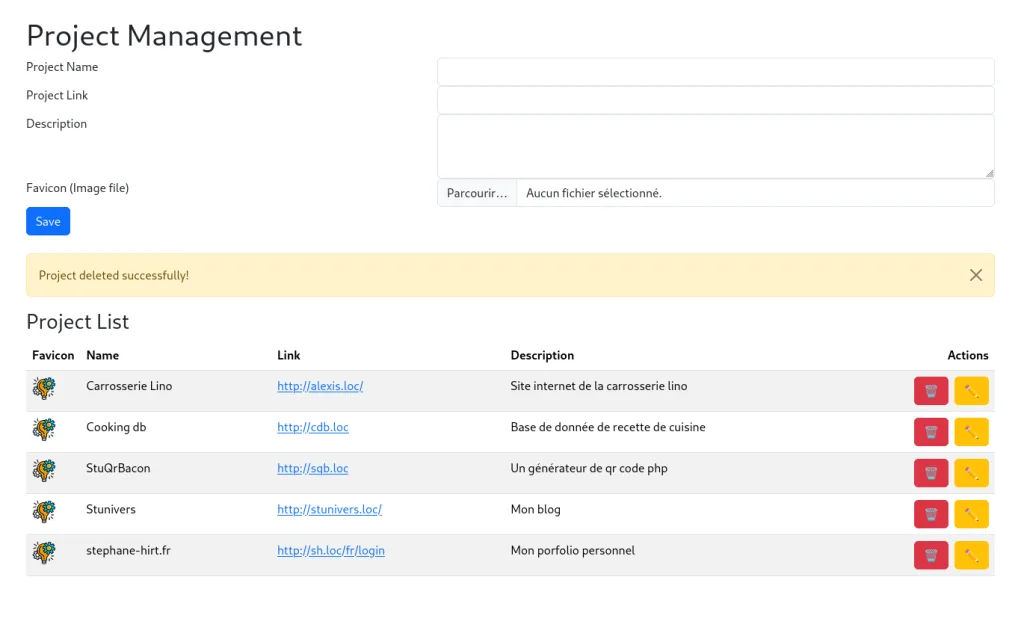
This modest micro-project aims to allow me to manage the projects I develop on a simple web page.
Before, I used Firefox bookmarks among other things for this purpose without too much difficulty. But just because I use Firefox doesn't mean I forget all Chrome clones; doing work twice is inefficient.
Additionally, I have two machines where I work. Adding more complexity, one of them has a dual-boot setup, and it can happen that I test the project on both operating systems for compatibility reasons. Therefore, I need a high level of consistency between environments.
Thus, by creating a simple web page accessible via browser that serves as local bookmarks to my environment, all I had to do was add this page to my favorites in the browsers I use for local testing. It's that straightforward.
Here is a screenshot of the project:
2. The Requirements
The promises of this micro-project are as follows:
- To be compatible with PHP 7-8
- To be easy to understand
- To be as compact as possible
- As few lines of code as possible, all in one file
This is the approach guiding this micro-project.
3. The Project Today
Since the first version presented in this article, StuProjectManager has evolved significantly. The initial idea remains the same: to have a simple web page that allows me to quickly find different projects I am working on, especially local environments accessible via my various vhosts.
However, the original small PHP script has gradually been replaced by a slightly more structured application.
The project is now at version 0.4 and requires PHP 8 or later, as well as the SQLite3 extension. Installation also goes through Composer.
The goal remains unchanged: not to turn this tool into an overly complex system.
3.1. Projects and Categories
The first logical evolution was the addition of categories.
Instead of having a long list of projects, it is now possible to organize them by categories and navigate between these directly from the interface.
Each project can include:
- a name;
- an URL;
- a description;
- a category;
- a display order;
- a favicon.
Categories are also manageable from the interface: creation, modification, and deletion.
For example, you could have categories like Clients, Personal, Tests, Local, or simply organize them according to your own workflow.
The categories can also be reordered. The defined order is used to determine the order of tabs in the interface.
3.2. A Customizable Display Order
A small feature that may seem insignificant at first but becomes very practical when you start having many projects: the display order.
Each category has its own order, and each project also has an individual display order.
You can therefore decide precisely the order in which categories appear, as well as the order of projects within each category.
A lower number simply means that the element will appear earlier in the list.
This avoids having to artificially rename your projects or categories just to achieve the desired order.
3.3. Links Are No Longer Limited to HTTP
The project has also evolved in terms of link management.
StuProjectManager now accepts links:
- HTTP;
- HTTPS;
- FTP.
Adding support for FTP is particularly useful in a development context where some projects or resources may still be accessible directly via this protocol.
However, the favicon retrieval process remains web-related: automatic favicon fetching works for HTTP and HTTPS links. For FTP links, it's still possible to manually add an icon.
3.4. Proper Favicon Management
Favicons have also evolved since the first version.
It is now possible to use favicons for projects as well as categories, with direct file management handled by the application.
For projects accessible via HTTP or HTTPS, StuProjectManager can also attempt to automatically retrieve the favicon from the project's URL.
The goal remains practical: quickly identify a project visually without having to read its name or URL every time.
3.5. Backup and Restoration
This is probably one of the most significant improvements compared to the first version.
Since the project is designed to centralize links to my development environments, losing the database or having to rebuild it manually would be quite cumbersome.
StuProjectManager now includes an integrated backup and restoration system.
From the interface, a button allows you to generate a ZIP archive containing:
- projects;
- categories;
- favicons.
The data is stored in JSON files accompanied by the folder containing the favicons.
Restoration works in reverse: simply provide a previously generated archive.
Before overwriting current data, the application also performs a backup of existing databases and favicons with timestamping.
Restoration also handles automatic database schema migration when necessary.
This allows for evolving the application's structure without having to manually rebuild its database with each new version.
3.6. A Simple SQLite Database
Despite these new features, I've stayed with SQLite.
It remains a choice that aligns well with the initial goal of the project: StuProjectManager is not intended to be an application requiring a dedicated database server.
The projects.db database is created automatically when you use the application.
The application also uses SQLite's integrity constraints to ensure that each project is always associated with an existing category. A category cannot therefore be deleted as long as projects are still associated with it.
It’s a small detail, but this kind of thing helps keep the application simple while preventing the database from becoming inconsistent.
3.7. The Application Has Also Been Structured
The main difference compared to the version presented in the original article is found in the project organization.
The code is no longer grouped into a single PHP file.
The repository is now organized into several parts, including:
app/for the application code;public/for the web-accessible part;tests/for tests;docs/for documentation;- Composer for dependency management.
The project also includes Doxygen-generated documentation, which allows generating documentation for classes, methods, and PHP files based on comments in the code.
We still have a relatively small application, but with a structure that starts to resemble that of a maintainable little project.
3.8. Automated Tests
Another difference from the original version: the project now includes automated tests with PHPUnit.
The tests focus particularly on the Project and Category models and use a temporary SQLite database to avoid modifying the real application data.
This allows you to verify the behavior of project and category management, as well as the database integrity constraints.
For such a small project, this is obviously not necessary. However, as StuProjectManager evolves, having some tests gives you more peace of mind when modifying the code.
4. Installation and Usage
The installation remains intentionally simple.
You just need to retrieve the repository, install dependencies with Composer, and then start a PHP server using public/ as the web root.
For example:
git clone https://github.com/Steform/StuProjectManager.git cd StuProjectManager composer install php -S localhost:8000 -t public
The SQLite database is created automatically.
Since the project is primarily intended for a local development environment, it can then be integrated into your own web environment, for example behind a virtual host, and accessed like any other local application.
Once connected to the interface, the functionality is quite straightforward: categories allow you to filter projects, projects are displayed in the defined order, and the various actions of creation, modification, and deletion are accessible directly from the interface.
5. The Result
In the end, StuProjectManager has evolved significantly since the small script that I originally used just to replace my browser bookmarks.
The principle remains exactly the same.
I have several web projects, multiple environments, different browsers, and various machines. Instead of maintaining separate favorite collections for each environment I use, I now have a dedicated small application that centralizes everything.
I can find my projects there, organize them, reorder them, associate icons with them, and manage their links from a single interface.
And most importantly, I can save the entire setup to restore it elsewhere if needed.
The application remains intentionally quite simple. I didn't aim to create a full-fledged project management tool with users, tasks, scheduling, notifications, or other features that would eventually stray from its initial purpose.
StuProjectManager simply serves to manage my links to web projects.
And in the end, it's probably this simplicity that remains the most important part of the project.
6. Conclusion
What started as a small PHP script with just a few dozen lines has grown significantly along with my needs.
Categories, custom sorting, favicons, backup/restore, migrations, and tests have been added gradually as the use of the tool revealed new requirements.
But I want to keep the original philosophy: a personal, simple, lightweight, and practical tool for quickly finding web projects.
The project is available on GitHub:
StuProjectManager https://github.com/Steform/StuProjectManager
The repository also contains installation instructions, documentation, and tests.


Comments
No approved comments yet.
Sign in with a commenter account to post a comment. Sign in.